My thread has malware?

@Digifiend: Maybe. But as I said, I get it on my home PC's IE8 as well.

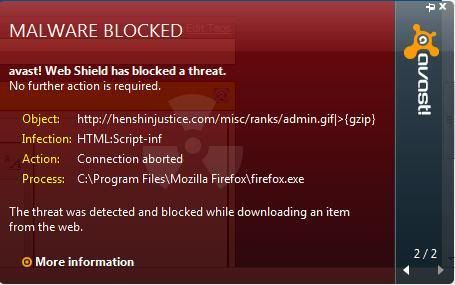
@Keith: I dunno about everyone else, but this is the error message I get (sorry for the IMG post, but I figure other people can confirm if this is the same one they get)
Avasterror.jpg
 
Chances are it's probably the settings (probably something really small that normally wouldn't be noticed) on the Avast on the individual user's computer that's setting it off.
 
@Digifiend: Maybe. But as I said, I get it on my home PC's IE8 as well.

@Keith: I dunno about everyone else, but this is the error message I get (sorry for the IMG post, but I figure other people can confirm if this is the same one they get)

I get the same error message as in the picture. It completely blocks the main page. I get the pop-ups on the forums from time to time (especially in this thread, but only certain pages) but only the main page is totally blocked. Avast won't even allow it to load. I have a factory new machine with Windows 7 and Avast, no other virus protection or conflicting software.
 
I just downloaded Avast because my Norton expired, and I keep getting the same message as well. It doesn't really bother me (mostly because I kinda like the look of how it pops up, lol), but still curious as to why it's happening.
 
It does that with the forums, but it still allows the threads to show.
But my problem is with the main page, it doesn't allow me to load it at all until I turn off the shield.
 
Here is what I have discovered.

I use the HJU mode(or gray skin background) when I'm on HJU. Ever since the last HJU shut down or maintenance, everytime I get on HJU, even though I have the HJU mode on, the background is white with a grey outline.

Anyway, when this avast problem came up, every thread I'm on including has the warning come on six times. However, I have discovered that if I click on one recent thread links on the right hand side of the screen, not only does the full HJU mode(grey) background come back full time until I leave HJU, the avast warnings stop completely.

I don't know if this helps or not but that is what I see when I'm on here.
 

how to help support popgeeks, popgeeks, pop geeks

Latest News & Videos

Latest News

Back
Top